
Device Credentials
The SNMP Device Credentials screen allows users to configure and manage SNMP credentials for accessing Virtual Machines, Hosts, and Network Devices. These credentials are used for authenticating SNMP access during device onboarding and metric polling in SNMP-based environments.
Navigation: Infrastructure → Device Credentials → SNMP Tab
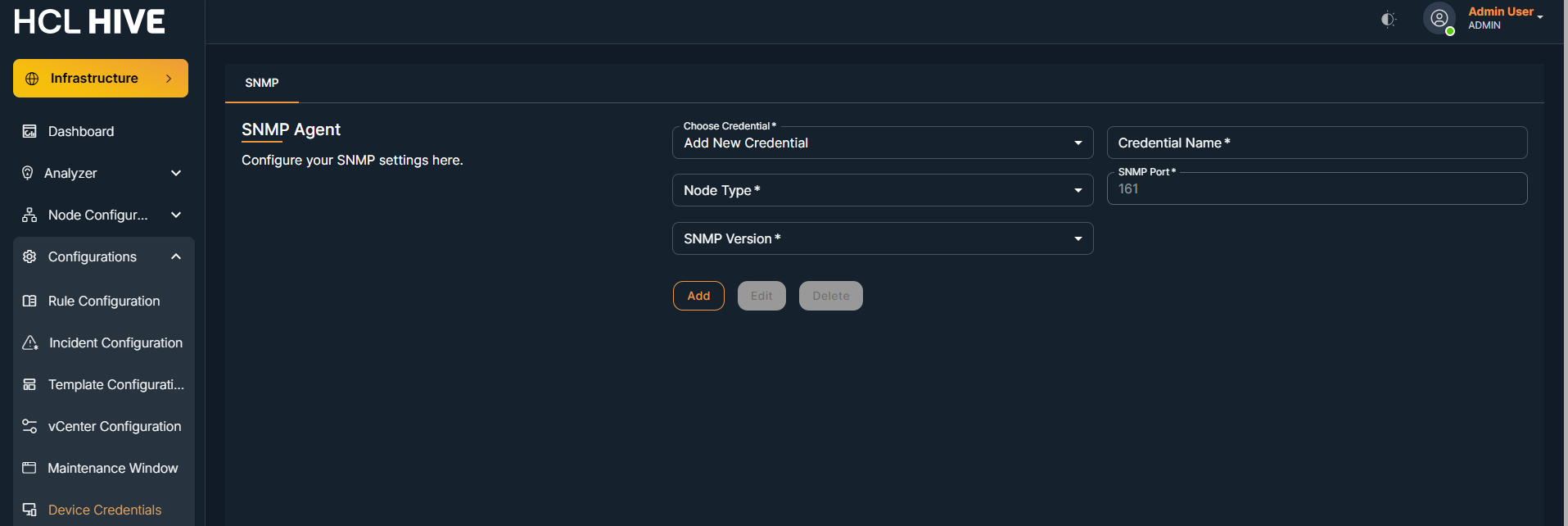
| Field Name | Mandatory | Description |
| Credential Name | Yes | A unique, readable name to identify the SNMP credential. |
| Node Type | Yes | Type of node for which SNMP will be used (e.g., VirtualMachine, Host, Network Devices). |
| SNMP Port | Yes | Port used for SNMP communication. The default is 161. |
| SNMP Version | Yes | Select SNMP version: v1, v2, v2c, or v3. |
| Community String | Yes (for v1/v2/v2c) | Authentication string used for SNMP access. Example: hcl-observability. |
| User Name | Yes (for v3) | Username for SNMPv3 authentication. |
| Auth Password | Yes (for v3) | Authentication password for SNMPv3. |
| Auth Protocol | Yes (for v3) | Authentication protocol (e.g., MD5, SHA). |
| Private Password | Yes (for v3) | Privacy password for encryption (SNMPv3 only). |
| Privacy Protocol | Yes (for v3) | Encryption protocol (e.g., AES, DES) used in SNMPv3. |
| Context Name | Optional | Context identifier used in SNMPv3 environments. |
Actions Available:
Add: Save the newly entered SNMP credential.
Edit: Update an existing credential.
Delete: Remove the selected credential.
Steps to Add SNMP Credential:
- Navigate to the SNMP tab in the Device Credentials section.
- Click Add New Credential.
- Fill in the required fields:
- Credential Name
- Node Type (VirtualMachine, Host, or Network Devices)
- SNMP Port
- SNMP Version
- Based on the version selected:
- For SNMPv1/v2/v2c: Provide Community String
- For SNMPv3: Fill in User Name, Auth Password, Auth Protocol, Private Password, Privacy Protocol, and optionally Context Name
-
Click Add to save the credential.