Note: Only Administrator and EFT Supervisor type users have access to this module.
Click the Tools > Maintenance > App Environment category button sequence then the Backup EFT World tab.
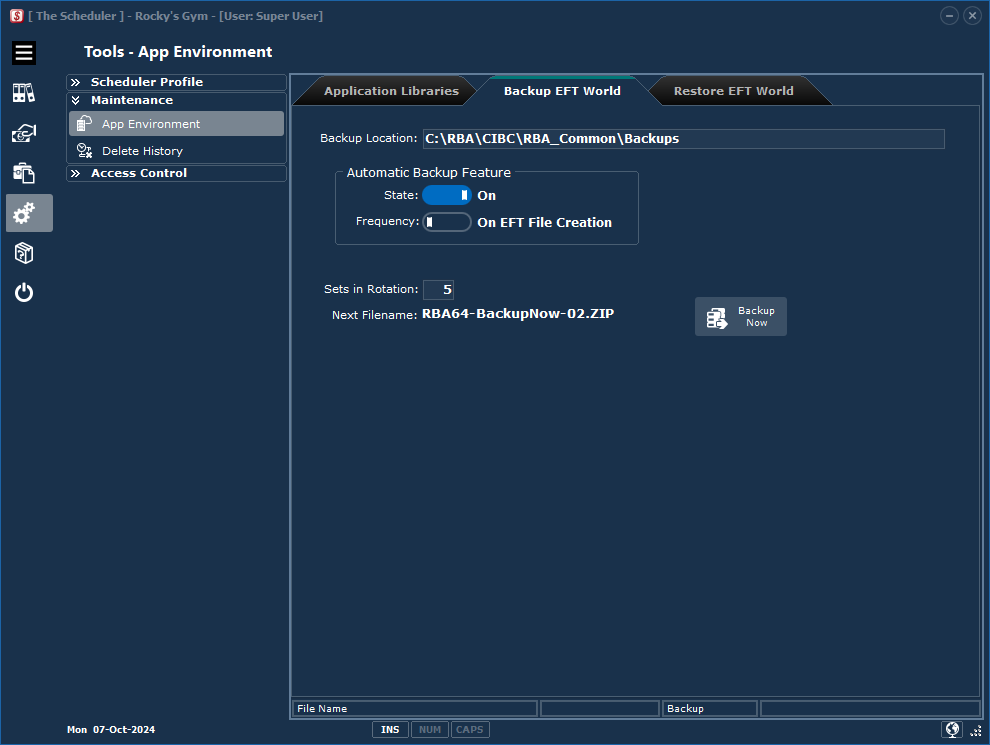
Backup Location: |
The backup location is always a sub folder of the Application Library block base folder. |
Automatic Backup Feature: |
•State: On or Off •Frequency (On EFT File Creation or On Program Close) |
Sets In Rotation: |
Tell The Scheduler how many backups to keep. |
Backup Now: |
Run the task now! |
Important Note!
If your organization does not have a backup procedure in place to protect your data files, RB Anderson Ltd. recommends using this backup facility. The encrypted ZIP file created contains all your client information and user profiles. Store your backup media in a secure place in case you have to re-install The Scheduler on your computer or move the application to another work station.
Failure to do this will result in a lot of unnecessary work and stress to re-enter all your client information.