Tag That Photo User Guide - Part 5¶
Metadata Management and Technical Details¶
Understanding Metadata Management¶
What is Metadata?¶
Metadata is "data about data" - information embedded in or alongside your image files describing: - Who is in the photo (face tags) - When it was taken (date/time) - Where it was taken (GPS coordinates, location names) - What it contains (keywords, descriptions) - Technical details (camera settings, dimensions)
TTP's Metadata Philosophy¶
Tag That Photo is built on the principle that you should own your metadata. Your tags and organizational work should:
- Be portable - not locked in proprietary databases
- Use industry standards - readable by other applications
- Travel with your images - embedded in the files themselves
- Survive software changes - not dependent on any single vendor
This is why TTP writes metadata directly into your images using Adobe XMP format and other industry standards.
ExifTool: TTP's Metadata Engine¶
Tag That Photo uses ExifTool (by Phil Harvey) as its primary engine for reading and writing image metadata. ExifTool is the gold standard for image metadata processing and supports hundreds of metadata formats across thousands of camera and software types.
Key benefits of using ExifTool:
- Broad format support — Reads and writes metadata in JPEG, TIFF, PNG, HEIC, and virtually all RAW formats
- Standards compliant — Fully supports EXIF, IPTC, and XMP standards
- Reliable — Used by professional photographers and researchers worldwide
- Full Unicode support — Handles non-Latin characters in all metadata fields via UTF-8
Family History Metadata Working Group (FHMWG)¶
Tag That Photo supports the recommendations of the Family History Metadata Working Group (FHMWG), a collaborative effort focused on key metadata areas cherished by family historians — names, dates, locations, events, and captions. By embedding metadata directly into image files using existing standards like IPTC, XMP, and EXIF, TTP helps preserve family history information for future generations.
More information: https://savemetadata.org/
Metadata Standards Used by TTP¶
Storage Locations¶
For JPEG Images¶
Metadata is embedded directly within the image file in multiple formats: - EXIF - Camera and technical data - IPTC - Descriptive information (keywords, captions) - XMP - Modern extensible format (includes face regions)
Sidecar reading: TTP will read an .xmp sidecar alongside a JPEG if one is present. This ensures that tags created while TTP was in Non-Embedded mode are always visible, even after switching back to Sync mode.
Sidecar writing: In Sync mode (default), TTP writes metadata directly into the JPEG file. If a sidecar already exists alongside the JPEG, TTP also updates it to stay in sync. TTP does not create a new sidecar for JPEG in Sync mode. To create JPEG sidecars, enable Non-Embedded mode (see Export Settings below).
For TIFF Images¶
Metadata is embedded directly within the TIFF file (EXIF, IPTC, and XMP). TTP also writes a matching XMP sidecar file alongside every TIFF, keeping both in sync automatically. You do not need to manage this — TTP creates the sidecar if one doesn't exist and always updates both on every write.
For PNG and RAW Images¶
Metadata is stored in an XMP sidecar file only: - Same filename as image, with .xmp extension (e.g., photo.cr2.xmp) - Plain text XML format - Typically less than 20KB in size - Human-readable (open in any text editor)
Critical: When moving these images, always move the .xmp file with them!
For HEIC Images¶
TTP reads embedded XMP written into HEIC files by other applications (such as Apple Photos or the iOS camera), and also reads the accompanying .xmp sidecar if one is present.
In Sync mode, TTP now writes metadata to both the embedded XMP inside the .heic file and the .xmp sidecar file, keeping them in sync automatically. (Embedded HEIC write is newly added and requires testing.)
In Non-Embedded mode, TTP writes to the .xmp sidecar only — the original .heic file is never modified.
Critical: When moving HEIC images out of TTP's managed folders, always move the .xmp sidecar file with them.
Sidecar Support Summary¶
| Format | Embedded XMP | XMP Sidecar | Notes |
|---|---|---|---|
| JPEG | ✅ Read + Write | ✅ Read; Write if exists | Reads sidecar if present; writes sidecar only if one already exists (Sync) or always (Non-Embedded) |
| TIFF | ✅ Read + Write | ✅ Read + Write | Both always written simultaneously in Sync mode |
| PNG | ❌ | ✅ Read + Write | Sidecar is the only storage |
| HEIC | ✅ Read + Write† | ✅ Read + Write | Both written simultaneously in Sync mode; sidecar only in Non-Embedded mode |
| RAW | ❌ | ✅ Read + Write | Sidecar is the only storage |
† HEIC embedded write is newly added and requires testing.
Face Region Standards¶
TTP supports three face region metadata standards and writes to all three simultaneously for maximum compatibility.
1. Metadata Working Group (MWG)¶
- Industry-wide standard
- Supported by Adobe, Apple, and others
- Broadest application compatibility
- Uses center-point normalized coordinates (0.0–1.0)
- Reference: MWG Guidelines PDF
2. Microsoft Photo Region Info (MPRI)¶
- Used by Microsoft Photo Gallery
- Windows Explorer reads and displays these regions
- Good for Windows ecosystem compatibility
- Uses top-left corner coordinates
- Specification: Microsoft Photo 1.2 Schema
3. IPTC Extension (ImageRegion)¶
- Part of the IPTC Photo Metadata Standard
- Growing adoption in newer photo applications
- Includes both face region coordinates and a simple
PersonInImagename list - Uses center-point normalized coordinates (same as MWG)
- Reference: IPTC Photo Metadata
Recommendation: Enable all three formats in Settings for maximum compatibility.
TTP also normalizes face coordinates using current orientation data to prevent drift on images with non-standard EXIF orientation metadata.
How TTP Reads Metadata¶
When TTP scans an image, it reads from multiple tag locations using a priority-based fallback system. The first non-empty value found in the priority list is used.
How TTP Detects Metadata Changes¶
TTP marks a file for metadata re-read when one or more of these signals is detected during scan:
- The image file's last-write timestamp changed
- The .xmp sidecar was newly created or its timestamp changed
- The image's XMP:MetadataDate differs from the canonical metadata date stored in TTP
If a metadata-triggered re-read changes effective canonical values (for example keywords, location, title fields), the corresponding sections are marked dirty so the reconciled DB state can be exported back to files.
Additional workflow behavior:
- Pending metadata changes are shown only when values actually differ
- Newly scanned files are queued for export only when your metadata settings require it
- After a folder scan you start yourself, TTP can ask whether to write pending metadata now. OK starts export; Cancel leaves files unchanged (they stay marked until you export later).
Reading Priority¶
Title¶
Read from (in priority order):
XMP-dc:Title/XMP:TitleIPTC:Headline
Description (Caption)¶
Read from (in priority order):
XMP-dc:Description/XMP:DescriptionIPTC:Caption-Abstract
Keywords¶
Read from (in priority order, all sources merged):
XMP-dc:SubjectXMP:SubjectIPTC:Keywords
Logic: All keyword lists are merged into a single deduplicated list. Keywords that match person names are stored as people (not keywords) unless "Export Names as Keywords" is also enabled.
Keywords that contain a comma (October 2026): A keyword such as Surname, First is written as one keyword. Tag That Photo chooses a list separator that does not appear in the keyword text, so the comma is not treated as a split. When reading keywords back, only the Windows XPKeywords field is treated as a comma-joined list. A single IPTC or XMP keyword that already contains a comma stays as written.
Date Taken¶
Read from (in priority order):
EXIF:DateTimeOriginal(camera date, when present)EXIF:CreateDateDateCreated(XMP / IPTC)
If those tags disagree, TTP still uses this order for the displayed date and records another distinct value as an alternate (see Handling Date Discrepancies).
Date precision options now support:
- Full date + time
- Date-only
- Year-only (helpful for historical archives)
GPS Coordinates¶
Read from (in priority order):
EXIF:GPSLatitude,EXIF:GPSLongitude(with Ref tags)XMP:GPSLatitude,XMP:GPSLongitude
Supported GPS formats:
- DMS:
39 deg 46' 54.12" N - Compact:
39,46,54.12N - Decimal Degrees:
39.7817or-89.6501
Both latitude AND longitude must be present to constitute a valid GPS entry. Altitude is optional.
Location (Address)¶
Read from (in priority order):
- Structured IPTC Extension
LocationShownobject — extracts City, State/Province, Country, Sublocation, and free-form venue name (LocationName) as a single unit - Flat XMP/IPTC tags as fallback:
XMP-photoshop:City,IPTC:City,XMP-photoshop:State,IPTC:Province-State,IPTC:Country-PrimaryLocationName, etc.
Face Regions¶
Read from (in priority order — only ONE source used to avoid duplicates):
- MWG (
XMP-mwg-rs:RegionInfo) - Microsoft MP (
XMP-MP:RegionInfoMP) - IPTC Extension (
XMP-iptcExt:ImageRegion)
Logic: Regions are read from the highest-priority source that contains regions. This prevents duplicate faces from appearing when a file already contains regions in multiple formats.
Author / Creator¶
Read from (in priority order):
XMP-dc:Creator/XMP:CreatorEXIF:Artist
Copyright¶
Read from (in priority order):
XMP-dc:Rights/XMP:RightsEXIF:Copyright
How TTP Writes Metadata¶
When metadata writing is enabled, TTP uses ExifTool to write your tags to standard locations in the image file (or its XMP sidecar).
Metadata Write Locations¶
| Data Type | Written To |
|---|---|
| Title | XMP:Title, XMP-dc:Title (+ IPTC via ExifTool) |
| Description | XMP:Description, XMP-dc:Description (+ IPTC via ExifTool) |
| Keywords | XMP-dc:Subject (+ IPTC via ExifTool) |
| Author | XMP-dc:Creator, XMP-photoshop:AuthorsPosition |
| Copyright | XMP-dc:Rights, XMP:Copyright |
| Date Taken | EXIF:DateTimeOriginal, EXIF:CreateDate, IPTC DateCreated/TimeCreated, XMP DateCreated / DateTimeOriginal / photoshop:DateCreated |
| Metadata Date | XMP:ModifyDate, XMP:MetadataDate |
| GPS Coordinates | EXIF:GPSLatitude, EXIF:GPSLongitude, EXIF:GPSLatitudeRef, EXIF:GPSLongitudeRef |
| GPS Altitude | EXIF:GPSAltitude, EXIF:GPSAltitudeRef |
| Location (Address) | Structured XMP-iptc4xmpExt:LocationShown object |
| Location Compatibility Fields | XMP-photoshop:City, XMP-photoshop:State, XMP-photoshop:Country, XMP-iptcCore:Location |
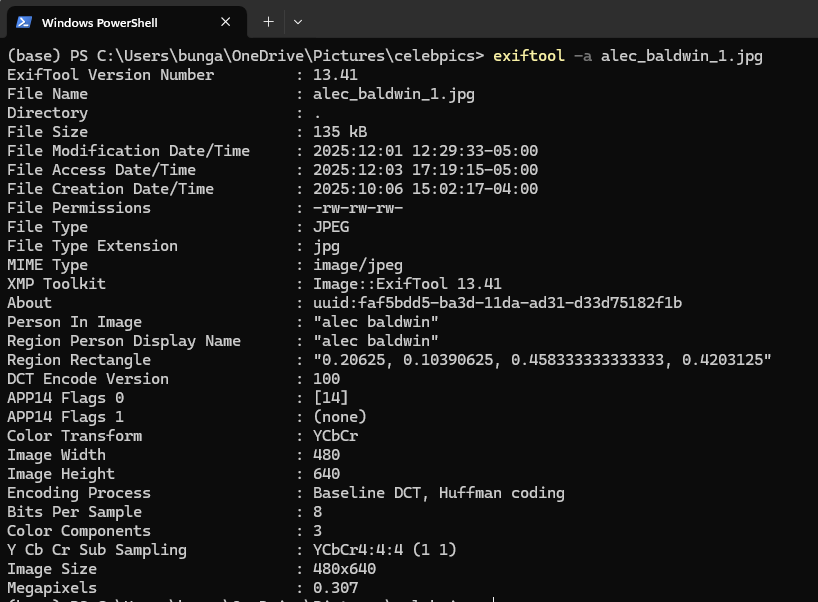
| Face Regions (MWG) | XMP-mwg-rs:RegionInfo (center-point struct) |
| Face Regions (MS) | XMP-MP:RegionRectangle, XMP-MP:RegionPersonDisplayName (top-left rectangle + name arrays) |
| Face Regions (IPTC) | XMP-iptcExt:ImageRegion (center-point struct) |
| Person Names | XMP-iptcExt:PersonInImage (simple deduplicated name list) |
| Creator Tool | XMP:CreatorTool |
Structured Location Writing¶
TTP writes all location information — city, state/province, country, sublocation (venue address), and free-form location name — as a single structured IPTC Extension LocationShown object. This is more standardized than writing each field to a separate tag and provides better compatibility with IPTC-compliant applications.
Example of what TTP writes:
LocationShown[0].City             = Springfield
LocationShown[0].ProvinceState    = Illinois
LocationShown[0].CountryName      = United States
LocationShown[0].Sublocation      = Lincoln Home
LocationShown[0].LocationName     = Abraham Lincoln's House
The Sublocation field holds the specific address or venue name, while LocationName holds a free-form descriptive name for the location.
Location editing improvements now make it easier to maintain both structured address data and user-friendly location titles together.
Metadata Writing Process¶
Writing happens as a background process:
- You tag faces or add keywords in TTP
- Changes are saved to the TTP database immediately
- A background service queues the image for a metadata update
- When the system is idle, metadata is written to the image files
- The XMP metadata date is updated to track the modification
Priority: User actions always have priority over background metadata writing.
For large batches, TTP now keeps a shared ExifTool session active across the write queue, which significantly reduces per-file overhead during bulk metadata operations.
Metadata Merge and Reconciliation¶
When TTP reads metadata from an image during import or a re-scan, it merges the file's metadata with what is already stored in its database. The goal is to never lose your tagging work, while still picking up new information from the image files.
Canonical Model for Duplicate Physical Files¶
When multiple physical files have the same pixel hash and orientation, TTP treats them as one logical image (TtpImage) with multiple attached ImageFiles.
- Metadata is reconciled into one canonical DB record
- If re-import detects metadata-driven changes, dirty sections are flagged on that canonical record
- When metadata export runs, TTP writes the reconciled canonical state back to all physical copies linked to that logical image
General Merge Rules¶
| Field | Merge Rule |
|---|---|
| Title, Description, Author, Copyright | Fill a blank DB field from metadata. If the DB already has a value (user-edited), the DB value wins and is not overwritten. |
| Keywords | Add keywords from metadata that are not yet in the DB. Keywords already in the DB are always kept — even if they are not in the file. |
| Face Regions | Fuzzy-match names to existing people; add new faces found in metadata. Faces in the DB are never removed based on file content. |
| GPS Coordinates | Copy from metadata if DB has no GPS. If both DB and file have GPS, the DB value is preserved as canonical. If a metadata-triggered pass indicates GPS was removed, DB GPS is cleared. |
| Location (Address) | Fill blank DB address fields from metadata. If DB address fields already have values, they are preserved. If a metadata-triggered pass indicates address data was removed, DB address fields are cleared. |
| Date Taken | Preserve DB value as canonical. If the file has a different date, record it as an alternate for user review. |
Handling Date Discrepancies¶
TTP flags a photo when date tags in the file disagree (for example EXIF 2007 vs XMP 2010), or when a rescan finds a file date that differs from the date already in the catalog.
On first import, the camera/EXIF date (DateTimeOriginal when present) is the displayed date. On a later rescan, TTP keeps the catalog date and records the other value as an alternate so your edits are not overwritten.
You can resolve a discrepancy in either place:
- Photo Viewer → Tags: a Yes / No / Cancel prompt. Yes keeps the camera/EXIF date; No uses the other metadata date; Cancel leaves it flagged.
- Stats → Data Quality → Date Discrepancies: Review opens the photos; Fix dates applies the same choice to every flagged photo.
Either choice clears the flag and, when metadata export runs, writes that one timestamp to all date tags listed above. Export must actually run (jobs not paused) before the file on disk is unified.
Year-Only Dates (Historical Photos)¶
Some applications — including Adobe Photoshop — store year-only dates for historical photos, writing just "1922" rather than a full date and time. TTP handles this gracefully:
- A year-only value like
"1922"is interpreted as January 1st at midnight of that year internally - For discrepancy detection, January 1st at midnight and January 1st at noon of the same year are treated as equivalent — no conflict is reported
- This prevents false discrepancy warnings when different applications normalize the same historical year-only date in slightly different ways
Example:
Photoshop writes:  "1922"              → interpreted as 1922-01-01 00:00
Another app has:   1922:01:01 12:00:00 → interpreted as 1922-01-01 12:00

Result: No discrepancy reported (year-only equivalence rule applied)
In the UI: When the date is January 1st at midnight, TTP can display it simply as 1922 rather than "January 1, 1922 12:00 AM," giving a cleaner look for historical photos.
Fuzzy Name Matching During Import¶
When reading person names from image metadata (face region tags, PersonInImage, or keywords), TTP uses fuzzy name matching to link names to existing people in the database:
- Similarity threshold: 0.90 (90% match required)
- Handles minor name variations such as slight misspellings or alternate forms
- Applies special handling for generational suffixes (Sr, Jr, I, II, III, etc.) — these are treated as identity-critical and will never be matched across different suffixes even when the base names are identical
- If no match is found at the threshold, a new person record is created automatically
Export Settings (What Gets Written)¶
You can control exactly which metadata fields TTP writes when exporting. These settings are found in Settings > Metadata.
| Setting | Description | Default |
|---|---|---|
| Export Image Metadata | Master switch — enables all metadata writing | ✅ On |
| Non-Embedded Metadata Mode | When on, TTP writes metadata to XMP sidecar files only and never modifies the original image file. This is sidecar-only mode (not a soft “prefer sidecar” option). See Metadata Write Mode below. | ❌ Off |
| Export Keywords | Write keyword list to image | ✅ On |
| Export Names as Keywords | Also write person names into the keyword list | ❌ Off |
| Export MWG Face Regions | Write MWG-format face regions | ✅ On |
| Export MS Face Regions | Write Microsoft MP-format face regions | ✅ On |
| Export IPTC Face Regions | Write IPTC Extension face regions | ✅ On |
| Export GPS Coordinates | Write GPS coordinates and address | ✅ On |
| Export Date Taken | Write the chosen date taken to EXIF, IPTC, and XMP date tags | ✅ On |
| Export Title | Write title field | ✅ On |
| Export Description | Write description/caption | ✅ On |
| Export Author | Write author/creator field | ✅ On |
| Export Copyright | Write copyright notice | ✅ On |
Tip: Enable Export Names as Keywords for compatibility with Adobe Lightroom, Apple Photos, and other applications that read people's names from the keyword list rather than from face region tags.
Metadata Write Mode: Sync vs Non-Embedded¶
TTP supports two metadata write modes, controlled by the Non-Embedded Metadata Mode setting.
These modes only apply when Export Image Metadata is ON. If Export Image Metadata is OFF, TTP does not write metadata in either mode.
Sync Mode (Default — Non-Embedded Off)¶
TTP writes metadata directly into the original image file. Where TTP supports both embedded and sidecar formats, it keeps them in sync automatically.
| Format | What TTP writes |
|---|---|
| JPEG | Embedded EXIF + XMP. If a sidecar already exists, it is also updated. |
| TIFF | Embedded XMP + sidecar simultaneously. |
| HEIC | Embedded XMP + sidecar simultaneously. (Embedded write requires testing.) |
| PNG | XMP sidecar only (format limitation — no change from Non-Embedded). |
| RAW | XMP sidecar only (format limitation — no change from Non-Embedded). |
Best for: Users who want GPS and date metadata visible in Windows Explorer, mobile apps, and other software that reads EXIF directly.
Non-Embedded Mode (Non-Embedded On)¶
TTP never modifies the original image file. All metadata is written to a .xmp sidecar file only.
- Embedded EXIF and embedded XMP writes are completely skipped.
- A
.xmpsidecar is created automatically alongside each image if one does not exist. - Works for all formats, including JPEG.
Best for: Users with archival or original-preservation requirements, or workflows where modifying original files is not acceptable.
GPS and date trade-off: In Non-Embedded mode, GPS coordinates and date-taken are stored in the sidecar only. Applications that read only EXIF (Windows Explorer, most mobile apps) will not display GPS location or date information.
Switching modes: Switching from Sync to Non-Embedded does not retroactively remove embedded data from files that TTP has already written. Future writes go to sidecar only.
XMP Sidecar Naming Convention (New in June 2026)¶
Settings now include an XMP sidecar naming convention selector for sidecar-based writes: - Auto (Recommended): RAW uses filename.xmp, other formats use filename.ext.xmp. - Modern: always filename.ext.xmp. - Legacy: always filename.xmp (recommended for Adobe Lightroom Classic compatibility). When a sidecar already exists, TTP preserves the existing sidecar filename to avoid duplicate/orphan sidecars after convention changes.
Metadata Write Failure Tracking and Auto-Retry (New in June 2026)¶
When metadata export fails for a file, TTP records the failure state and temporarily suppresses repeated write attempts for that file. If the source image or sidecar changes later, TTP clears the failure state and automatically re-queues the file for retry. This reduces repeated background churn while still recovering automatically once the blocking condition changes.
July 2026 refinements: - If a library folder is temporarily unavailable (for example a disconnected drive), metadata write work waits and continues when the folder returns instead of treating every attempt as a hard failure - Cases where a file already has the correct metadata are no longer reported as write errors - When another program (or Tag That Photo itself) briefly locks a photo during write or rotate, the change is kept and retried shortly afterward
October 2026 refinements: - A write that fails for a lasting reason (for example malformed camera MakerNotes) is recorded with the failure reason and the file’s last-write time. Tag That Photo moves on instead of retrying that file on every pass. When the photo changes on disk, the failure state clears and the write is tried again. - A file that is locked by another program stays in the write queue. It is not marked as a permanent failure, and the write is attempted again after the lock clears. - A write for a photo whose file is missing is skipped and the failure category is recorded. The work stays in the backlog and resumes if the file comes back. Editing that photo in Tag That Photo also clears the failure state. - Moving a photo whose name contains spaces or commas no longer creates a second catalog entry when Windows reports the 8.3 short name (for example CARLSB~1.JPG). The existing entry is updated.
HEIC Orientation and GPS Synchronization Improvements (New in June 2026)¶
HEIC proxy-orientation handling has been tightened so face regions align correctly after rotation-sensitive workflows. GPS synchronization now better reconciles file metadata with database location values based on real-world correction scenarios.
Expanded Location Interoperability Writes (New in June 2026)¶
In addition to structured IPTC LocationShown, TTP now writes compatibility-focused Photoshop/IPTC Core location fields to improve downstream behavior in Adobe tools and other readers. When location data is removed in TTP, the corresponding compatibility fields are cleared as part of the same write cycle.
Future-Proofing Your Tags¶
Why Standards Matter¶
By writing face tags using MWG, Microsoft, and IPTC standards, your tags:
- Survive vendor changes - not locked to TTP
- Work in other applications - see compatibility chart below
- Remain accessible - XML text format, not binary
- Follow industry direction - MWG widely adopted; IPTC Extension growing rapidly
Verifying Your Metadata¶
You can inspect metadata using free tools:
ExifTool (Command Line)¶
Free utility by Phil Harvey for reading/writing metadata — the same tool TTP uses internally.
Uses: - View all metadata in an image - Export metadata to CSV - Repair corrupted metadata - Batch metadata operations
Download: https://exiftool.org/
Quick check command:
For Data Quality problems (MakerNotes write failures, unreadable title/location, faces, dates, GPS), use the grouped dump and validate commands in Inspecting problem files with ExifTool. Prefer TTP’s exiftool.exe under C:\Program Files\Tag That Photo\ so the version matches the app. Inspect read-only first; TTP already applies ExifTool’s -m / -F recovery on write.
XnViewMP (Graphical Interface)¶
Free image viewer with excellent metadata display.
Features: - Visual metadata browser - Handles XMP sidecars - Can strip metadata if needed - Supports batch operations
Download: www.xnview.com
Data Quality Checks¶
The Stats tab includes a Data Quality section that runs multiple checks each time you open the Stats page:
| Check | Action Available |
|---|---|
| Orphaned Faces (face records pointing to deleted images) | Delete |
| Faces Missing Thumbnails | Fix (regenerates thumbnails) |
| People With Zero Faces | Delete |
| Images With Pending Processing | Review (opens in Photo Viewer) |
| Date Discrepancies (conflicting dates across EXIF/IPTC/XMP) | Review or Fix dates (keep camera/EXIF, or use the other date) |
| Overlapping Face Regions (same region tagged with different names) | Review |
| Possible Duplicate People (fuzzy name matches) | Review |
| Duplicate Images | Review |
After completing a folder scan, TTP can prompt you to review the Stats > Data Quality section and resolve detected issues immediately.
Cross-Application Compatibility¶
Applications That Read TTP Tags¶
| Application | Reads Face Tags | Face Standard(s) Supported | Reads Keywords |
|---|---|---|---|
| Adobe Lightroom Classic | ✓ | MWG | ✓ |
| Adobe Bridge | ✓ | ||
| Photo Mechanic 6 | ✓ | MWG | ✓ |
| ACDSee | ✓ | ||
| XnViewMP | ✓ | MWG | ✓ |
| Photo Supreme | ✓ | MWG | ✓ |
| GIMP | ✓ | MWG | ✓ |
| Windows Explorer | ✓ | MS Photo (MPRI) | ✓ |
| Photoscape X | ✓ | ||
| IrfanView | ✓ | ||
| digiKam | ✓ | ||
| Fast Picture Viewer | ✓ | ||
| Zoner Photo Studio | ✓ | ||
| Mylio | ✓ | MWG | ✓ |
| CyberLink PhotoDirector | ✓ | ||
| Capture One Pro | ✓ | ||
| Photos (macOS) | ✓ | ||
| Preview (macOS) | ✓ |
Note: The
PersonInImagetag — a simple list of person names that TTP writes to every image — provides a useful fallback for applications that don't support full face region coordinate standards. Those applications can still display who is in the photo.
End of Part 5: Metadata & Technical Details
Continue to Part 6: Troubleshooting & Appendix...