Click the Tools > Maintenance > Holiday Calendar Update category button sequence to display the Holidays form.
CIBC has changed their processing "rules". Their platform used to adjust due dates if they fell on a weekend or statutory holiday. They are no longer doing that so we've built this into The Scheduler.. Credit transactions will have the due date changed to the first previous business day and debit transactions to the next business day.
Twelve holiday entries can be made.. Click the drop down button on the date edit and navigate to the desired holiday date. The Scheduler will check if EFT transaction due dates fall on a weekend or statutory holidays entered.
Be sure to click the "Save Setup" button when done.
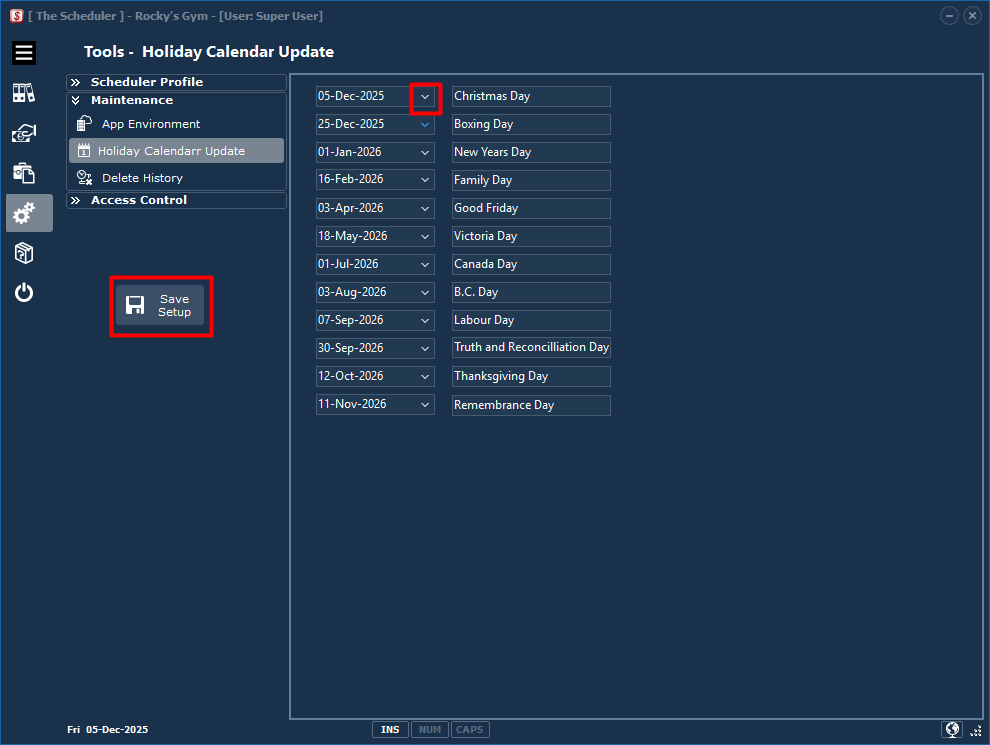
Entries are deleted if the computer system date is after a statutory calendar date. The Scheduler status bare indicates the statutory holiday list should be updated if there are less than 5 entries. The status bar flashes information about the Calendar list. Clicking on the text will take the user to this form.
